
Search for the best link in bio tool for fitness creators and you get a page of lists, nearly all of them written by a company that makes one of the tools on the list. That company’s tool comes first every time.
We make one too. It’s called trainlike.link, and we think it’s the best one for a fitness creator. You’d expect us to say that, so this guide shows why. It has every tool’s real prices, the cut each one takes when you make a sale, and the ways each one lets you earn.
What is the best link in bio tool for fitness creators?
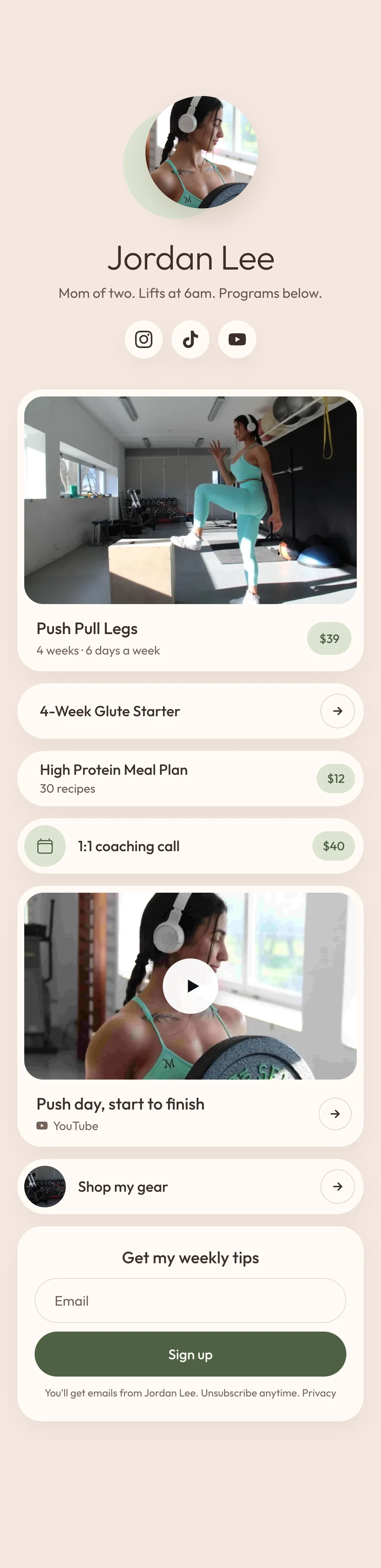
trainlike.link. It’s the only one of these built for fitness creators.
As a link in bio it does what the others do. You add your links, your videos and an email sign-up, pick a template, and see what people tap. All of that is free, and so are Instagram auto DMs.
Where it pulls ahead is when you start selling. You build your workout program inside your store, from an exercise library with a video for every exercise, and sell it next to your meal plans and coaching calls. You can turn that program into an AI skill your buyers add to ChatGPT, Claude or Gemini. And it pays you in two more ways that have nothing to do with your own sales, which we cover further down.
So you can start today with a plain page of links, and you won’t have to move anywhere when you make your first program.
The rest of this guide is how the other tools compare.
What a fitness creator needs from a link in bio
A link in bio tool started out as a page of buttons. You got one link on your profile, so you pointed it at a page that held all your other links.
Most of them now do a lot more, and for a fitness creator the extra parts matter more than the buttons. You probably want to sell a program or a meal plan and get paid on the page. If you coach, you want people to book a call and pay for it without messaging you back and forth about times. You want to collect emails, usually by giving away a free week of a program. And when someone comments a word on your post, you’d like them to get a DM with your link in it without you sending it by hand.
Every tool below can do most of that. Where they differ is in what they were built for first, in what they charge you when sales are still slow, and in how many ways they give you to earn.
The tools side by side
We read each company’s own pricing page in November 2026. Linktree shows different prices by country and showed us none this month, so its numbers are the US ones we read at the end of October.
| Tool | Free plan | Paid plans start at | Cut of each sale | Built for |
|---|---|---|---|---|
| trainlike.link | Yes | $29 a month | 9% on free, none on the $29 plan | Fitness creators |
| Linktree | Yes | About $11 a month | 12% on free, less on paid plans | Sharing links |
| Beacons | Yes | $10 a month | 9% on free and at $10, none from $30 | Brand deals and selling |
| Stan | No, 14 days to try it | $29 a month | None | Courses and digital products |
| Pillar | None on its pricing page | $39 a month | 5% at $39, none at $129 | Courses and digital products |
Whichever you pick, the card company has its own fee on top. In the US that’s usually 2.9% plus 30 cents a sale.
trainlike.link
This one is ours, so read it as the pitch.
Start with the link in bio itself. You get one page for your links, your videos, your social icons and an email sign-up. You pick a template or make your own, and your analytics show what people tap. It’s free, and it’s enough on its own if links are all you need right now.
Then there’s what you sell. Every other tool here treats a workout program as a file. You write it somewhere else, export it, upload it and set a price. The buyer ends up with a document they have to pinch and zoom on their phone in the middle of a set, and if they don’t know what a Romanian deadlift looks like, they go and search for it.
In trainlike.link you build the program in your store. You pick exercises from a library of more than 700, each with a video, and set the sets, the reps and your notes for every day. The buyer opens it on any phone and sees today’s workout, and they can tap an exercise to watch it done. You can still attach your own file for people who want one, and on an iPhone they can log the program in the Trainlike app.
You can also sell that program as an AI skill. More than 230 million people a week ask ChatGPT about health and wellness, and your buyers are some of them. A skill is your program in a form they add to ChatGPT, Claude or Gemini, so when they ask about their training, the answers come from your program. None of the other tools here has this. We wrote a whole guide on selling a program as an AI skill.
Next to your programs you can sell files like meal plans and guides, and take paid calls that go straight into your Google Calendar. Instagram auto DMs are on every plan. You can add a protein calculator, or a short quiz that shows each follower which of your programs fits them.
It’s free to start, with a 9% cut when you make a sale. The paid plan is $29 a month with no cut, and that’s the plan with AI skills and the two programs that pay you for more than your own sales. It’s also where you can show your store at your own domain, like yourname.com.
Linktree
Linktree is the one most people start with. It takes a few minutes to set up, and your followers have seen a hundred of them, so nobody is confused when they land on yours.
It has added selling over the last couple of years. You can sell files and take paid bookings on every plan, and its Instagram auto replies are on every plan too, with a monthly limit that goes up as you pay more. Courses run through Kajabi. It doesn’t send emails itself, so if you collect sign-ups you connect it to an email tool like Mailchimp.
The thing to watch is the fee. When we read its pages in October, the free plan’s cut was 12% of each sale, which is the highest on this list. The paid plans ran from about $11 to $39 a month in the US, and the cut drops as you move up.
If a page of links is all you need today, you can make the same page on trainlike.link for free, and it’s ready for the day you have something to sell. We compare the two in more detail on our Linktree page.
Beacons
Beacons has a big free plan. You get a store, Instagram auto DMs, a media kit and 50 emails a month to your list. Its cut on the free plan is 9% of each sale, the same as ours.
Its paid plans are $10, $30 and $100 a month. The $10 plan adds your own domain and still has the 9% cut. From $30 the cut goes away, and you get memberships and courses with video.
Beacons is built around brand work. The media kit comes with the free plan, and there are tools for pitching brands. That’s a different job from selling your own programs. A program on Beacons is a file or a course you film yourself, with no exercise library and nothing made for training. There’s more on our Beacons page.
Stan
Stan is the biggest of the stores that go in a bio. It has no cut of a sale on any plan.
It also has no free plan. You get 14 days to try it, and after that it’s $29 a month whether you’ve sold anything or not. That plan covers files, paid calls, a course builder, monthly subscriptions and Instagram auto DMs. Sending emails to your list, discount codes and add-ons at checkout come with the $99 plan. Stan’s help pages now list a third plan at $299, which is where you can use your own domain. On trainlike.link that comes with the $29 plan.
Stan has video courses and memberships, and we don’t. For workout programs, meal plans and calls, the same $29 on trainlike.link gets you a program builder and AI skills, and you can stay on the free plan until you’re selling enough for $29 to make sense. Our Stan page has the full comparison.
Pillar
Pillar is a general store for creators with a page aimed at fitness. What’s behind that page is the same as for everyone else, which is files, bookings, a course builder and a media kit.
It’s the most expensive on this list to sell with. The first plan is $39 a month and still has a 5% cut of each sale. To get rid of the cut you need the $129 plan, which is also the one with your own domain. On trainlike.link both come with the $29 plan. The trial we saw on its pricing page was 3 days.
It costs more than the others here, and nothing in it is made for selling a workout program. More on our Pillar page.
How many ways each one lets you earn
Selling your own things is one way to make money from the link in your bio. Some of these tools pay you in other ways as well.
| Tool | Sell your own products | Sell AI skills | Paid for creators you refer | Paid when followers subscribe to a workout app |
|---|---|---|---|---|
| trainlike.link | Yes | Yes | 20% of what they pay, for as long as they stay | 25% of every payment, by application |
| Stan | Yes | No | 20%, for as long as they stay | No |
| Beacons | Yes | No | 25%, for as long as they stay | No |
| Pillar | Yes | No | 20%, for as long as they stay | No |
| Linktree | Yes | No | Invite only, in the US | No |
The referral part works the way it does on Stan. You send another creator your link, they open a store and go on the paid plan, and you get 20% of what they pay every month they stay. The details are on our affiliate page.
The last column is something only we have, because none of the others has an app your followers can train in. Trainlike is a workout app for iPhone. If you’re accepted into the partner program, you get a code, and when a follower subscribes to the app with it, you get 25% of every payment for as long as they stay. You apply for it, and we review every application.
AI skills, the 20% and the partner program all come with the $29 plan. Add them to what you sell yourself, and trainlike.link gives a fitness creator more ways to earn from one link than any other tool on this list.
What a free plan costs once you sell
A free plan is only free until someone buys. Here’s what you keep from a $29 program on each one, before the card fee.
| Free plan | Its cut | Cut from a $29 sale | You keep |
|---|---|---|---|
| trainlike.link | 9% | $2.61 | $26.39 |
| Beacons | 9% | $2.61 | $26.39 |
| Linktree | 12% | $3.48 | $25.52 |
Eighty-seven cents doesn’t sound like much. Over 100 sales it’s $87, which is the price of three programs.
Then there’s the question of when to move to a paid plan. With a 9% cut, a $29 plan with no cut becomes the cheaper one once you sell more than about $320 a month, which is 11 or 12 copies of a $29 program. Below that, stay on the free plan. This is also why a tool with no free plan is a hard place to start, since you pay the $29 in the months you sell nothing too.
Where to start
We’d start on trainlike.link’s free plan, whatever stage you’re at.
If you sell nothing yet, put your links on it and add a free week of a program in return for an email. See how many people take it. That tells you whether a paid program is worth making, and it costs you nothing to find out.
If you already sell programs, build them in your store. We think a buyer who can follow the program on their phone has a better chance of finishing it, and someone who finishes is the person who buys your next one.
If you coach, add paid calls next to your programs, so a follower who isn’t ready for coaching can still buy something from you.
Once you sell more than about $320 a month, move to the $29 plan. You stop paying the cut, and you can add an AI skill and apply for the partner program.
We wrote about what to put on the page and how to sell your first program in two other guides.
Switching from another tool
None of these lock you in. Your old page keeps working until you change the link on your profile, so you can build the new one on the side and swap when you’re happy with it. What you should take with you is your email list. Download it before you cancel anything.
Questions people ask
What is the best link in bio tool for fitness creators?
trainlike.link, which is the one we make. It's a free link in bio built for fitness creators. You add your links and videos, build and sell workout programs with a video for every exercise, take paid calls, and sell your program as an AI skill for ChatGPT, Claude and Gemini.
Is Linktree or trainlike.link better for a fitness creator?
trainlike.link. Both give you a free page of links. On trainlike.link you can also build a workout program in your store, and the free plan's cut of a sale is 9%, where Linktree's was 12% when we checked.
Which link in bio tool lets you earn the most ways?
trainlike.link has the most ways to earn of the tools we compared. You can sell programs, files, calls and AI skills, get 20% of what creators you refer pay, and apply to get 25% when your followers subscribe to the Trainlike app.
Is there a free link in bio tool that lets me sell?
Yes. trainlike.link is free and you can sell on it from the first day, with a 9% cut of each sale. Beacons and Linktree have free plans you can sell on too. Stan and Pillar have no free plan on their pricing pages.
Can I sell a workout program from my link in bio?
Yes. With most tools you upload a file and set a price. With trainlike.link you build the program in your store, so the buyer gets it laid out by day on their phone with a video for every exercise.
Do I need a website as well as a link in bio?
No. A link in bio store can hold your programs, your calls, your links and an email sign-up, and take payments. Most fitness creators who sell from Instagram or TikTok never build a separate website.
When is a $29 a month plan cheaper than a free plan?
When you sell more than about $320 a month. A free plan with a 9% cut costs you $28.80 on $320 of sales, which is what a $29 plan with no cut costs.
Can I switch tools without losing sales?
Yes. Your old page keeps working until you change the link in your bio, so you can set up the new one first, check it on your own phone, and change the link when it's ready.
Where the numbers came from
Read in November 2026 from each company’s own pages, except where it says otherwise.
- Stan’s plans and Stan on its pricing
- Beacons’ pricing
- Pillar’s pricing
- Linktree’s pricing and its help pages on seller fees and Instagram auto replies, read at the end of October 2026 from the US.
- The referral rates are from each company’s own referral or affiliate pages, read at the end of October 2026.
- The 230 million number is OpenAI’s, from its launch of ChatGPT Health in January 2026, as reported by Fortune.
- Stripe’s pricing, for the card fee.