We look at a lot of fitness creators’ profiles, and the same setup keeps coming up. The link in the bio goes to a page of links. There’s a YouTube button on it, a discount code or two, maybe a podcast. And somewhere in that list is a button that says “Programs” and goes to a store, which is a different page made with a different tool.
So this person has a store. They wrote a program, priced it, made a cover for it. And to get there, a follower has to tap the bio link, find the right button in a list, tap that, and then find the program. That’s a lot to ask of someone who was only half thinking about buying.
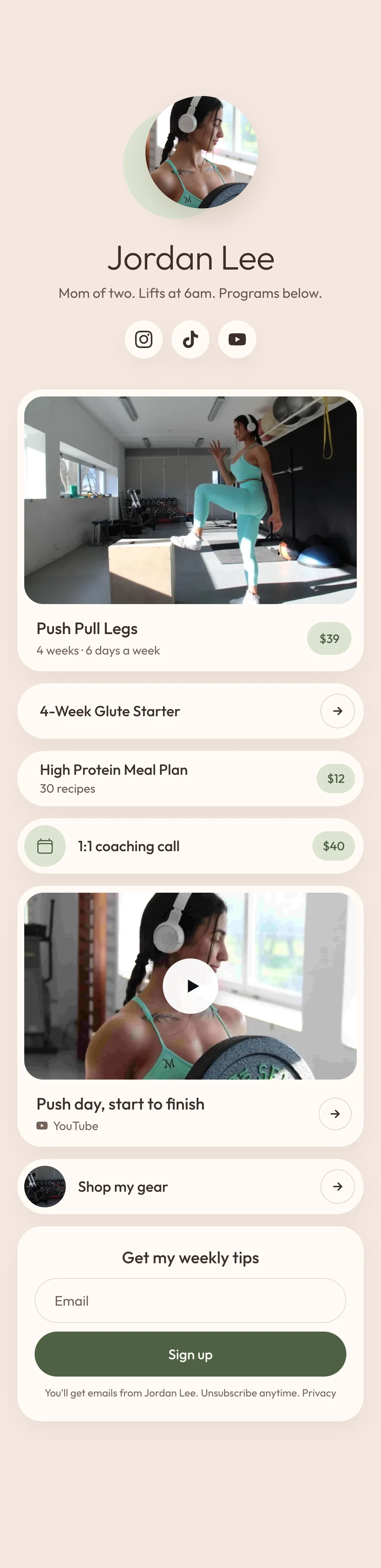
We think it should be the other way around. If you sell something, your link in bio should go straight to it. Your YouTube and your discount codes can sit on the same page, further down. You don’t need two pages for that, and most of the time you don’t need two tools either.
Do you need a links page if you have a store?
Short answer, no. For a fitness creator or coach who sells programs, the link in bio should open the store itself, with what you sell first and your other links under it on that same page.
We went looking for numbers on this. Some exist, and they mostly back it up. Some of what gets quoted turns out to be shaky, and we’ll say which.
Does Instagram’s five links fix it?
Instagram started allowing up to five links in a bio in April 2023, and a lot of people figured that was the end of needing a links page. You’d add your store, your YouTube and whatever else, and be done.
Go and look at a profile that does this, though. You see the first link, and next to it a small “and 2 more”. The other links are behind that. Instagram won’t tell you how often anyone opens them either, because it doesn’t count taps for each link.
So you still really have one link that people see, and you have to decide what it opens.
What people tap on a links page
Linktree, the biggest of the links page tools, has published some numbers about its own pages, and they’re the best we could find.
We expected them to show people giving up when they land on a list of links. They don’t. Over the year to April 2026, Linktree counted about 83 taps for every 100 visits that came from Instagram and TikTok. Some people tap more than once, so it isn’t quite 83 people in every 100, but it’s most of them.
They mostly tap whatever is near the top. Linktree’s 2023 report says the first three links on a page get much higher click rates than the ones below. It doesn’t give a figure, which is annoying, but it fits how anybody uses a phone.
Now think about where the store button usually sits. It’s rarely first. YouTube is first, or the newest video, or the code that pays a commission. If your store is fourth or fifth, a lot of the people who came from your profile are leaving through one of the buttons above it, and they never find out you have a program for sale.
We can’t tell you how many. Nobody publishes what share of taps goes to a store button. You can look up your own, and that’s a couple of sections down.
Does a shorter page sell more?
You’ll hear that giving people too many choices makes them buy less. There’s a jam study that gets quoted for this all the time. A grocery store put out 24 kinds of jam to sample, and 3% of the people who tasted one bought a jar. When it put out 6 kinds, 30% did.
There are website tests that went the same way. Unbounce cut the sign-up options on one of its own pages from four to three, and sign-ups went up 16.93%. A Dutch gift voucher shop called Pluimen tried a page with one button where it used to have two, with fewer links around it, and took in 19.7% more money over 47 days.
But in 2010 some researchers went back over 50 experiments like the jam one, with about 5,000 people in them. On average, the effect of having more choices came out at close to nothing. More choice hurt sales in some of those experiments and helped in others, and they couldn’t work out a rule for which.
So we wouldn’t tell you to cut your page down to one button because the research says so, because it doesn’t say that. What we’d take from it is smaller. The top of the page gets the taps, so your program should be at the top.
Nobody has tested this exactly
We should be straight about one thing. Nobody has published a test of a store in the bio against a store behind a links page. We looked. A few companies that sell store software throw around numbers like “three times more sales”, with nothing to show where they came from, so we’ve left those out.
What we have is an argument built from smaller things that are known. It makes sense to us, and you can check it against your own numbers in about five minutes.
Check your own numbers
Open the stats on your links page. It shows how many people viewed the page and how many tapped each button. Take the taps on your store button and divide them by the views.
Say 1,000 people opened the page last month and 150 of them tapped through to the store. That’s 850 people who came from your profile and never saw a price. Some of them only wanted the podcast, sure. Plenty of them just tapped the first thing they saw.
If your store button already gets most of the taps, none of this matters much for you. If it gets 10 or 15 percent, that’s probably why your program sells slower than you’d expect with the followers you have.
It happens without a links page too
Some creators don’t use a links page at all and still end up in the same spot. Coaching enquiries go to a form they made in one tool. The free guide is on a website. The programs are in a store. So the profile has a link for each, and a follower lands on whichever one they happened to tap.
Each of those works fine. But the person who fills in the coaching form and decides it costs too much never hears about the $30 program. The person who grabs the free guide never sees the store. Your email list ends up in one account and your buyers in another, so it’s hard to see who took the free guide and bought something later.
Putting it all on one page
You probably don’t have to switch tools to fix this. Most stores let you add an ordinary link next to the things you sell. So start by adding the links from your links page to your store.
Put what you sell on top. Under that goes the free thing you give away for an email, if you have one, for the people who aren’t ready to pay yet. Links that send people off to other sites go at the bottom, since anyone who taps one of those is gone.
The exception is an affiliate code that makes you more money than your programs do. Treat that one like a product and keep it near the top.
Then check the other jobs. If people book calls with you, can your store take a booking? If you give away a guide for an email address, can it do that and keep the list for you? If it can’t, we’d look for a store that can before adding another tool on the side.
Before you change the link in your bio, write down your sales and store visits for the last two weeks. Change the link, wait two weeks and compare. Store visits should go up straight away, since everyone who taps your bio now lands there. Sales are what you care about, and with a small following two weeks might not be long enough to tell, so give it a month.
If nothing has moved by then, put the old link back. That takes about a minute.
When to leave it alone
If you don’t sell anything of your own yet, or most of your money comes from brand deals and discount codes, keep the links page in your bio. There’s no point sending people to a store with nothing in it. When you’re ready to make something, we have a guide on how to sell your workout programs online.
You don’t have to delete it afterwards either. It’s still handy as a link to send a brand, or for a QR code at an event.
Where trainlike.link comes in
We make trainlike.link, so take this part as the pitch. It’s a store for fitness creators that goes in your bio. Your programs, files, paid calls, links, videos and an email sign-up all go on the one page. You can build a program in it from an exercise library where every exercise has a video, so a buyer gets something to follow on their phone along with your files. It’s free to start and takes 9% when you make a sale, or it’s $29 a month and takes nothing.
Questions people ask
What should a fitness creator put in their link in bio?
Your store, if you sell programs. Put what you sell first, then a free program or guide that asks for an email, then your other links like YouTube and discount codes, all on the same page.
Should my link in bio go to my store or a list of links?
To your store, once you have something to sell. The first few links on a page get most of the taps, so a store that sits halfway down a list of links is seen by fewer of the people who tap through. Until you sell something, a list of links is fine.
Do I have to delete my links page?
No. Keep it if you like. All that changes is that your profile sends people to your store, and the links page becomes something you hand out when you need a plain list of links.
Doesn't Instagram let me add five links now?
It does, since April 2023. But a profile only shows the first one, with a small note saying how many more there are. So whatever you put first is the one people see.
Will my other links get fewer taps?
Probably, yes. They'll be lower on the page than they are now. If one of them makes you more money than your programs do, keep that one near the top.
Do I need to change stores to do this?
Often you don't. Most stores let you add ordinary links next to what you sell. Check that yours can also do the other things you need, like booking a call or collecting an email.
How will I know if it worked?
Write down your sales and store visits for the two weeks before you change the link, and compare them with the two weeks after. Try not to launch anything during either one, because a launch will hide the difference.
Where the numbers came from
Read in November 2026, from each company’s own pages where possible.
- Linktree, a year of traffic by source
- Linktree’s 2023 Creator Report
- Unbounce on choice and sign-ups
- The Pluimen test, written up by VWO
- Scheibehenne, Greifeneder and Todd, “Can There Ever Be Too Many Options?”, Journal of Consumer Research, 2010
- Instagram’s change to five links was reported in April 2023 by Engadget, 9to5Mac and others.